- flexSDK 编译
bat文件:
(拖放mxml文件到该bat文件图标上,即可编译出swf,并打开swf);
D:\flex_sdk_3\bin\mxmlc %~dp0%~n1.mxml
call %~dp0%~n1.swf
pause
我要留言To Comment 阅读全文Read All | 回复Comments() 点击Count()
- 扩展Array类
模仿as3的Array,扩展as1,as2中Array类的功能
"extendArray.as"
Array.prototype.indexOf = function(value, num) {
num = isNaN(num) ? 0 : num;
for (var i = num; i<this.length; i++) {
if (this[i] === value) {
return i;
}
}
return -1;
};
Array.prototype.lastIndexOf = function(value, num) {
num = isNaN(num) ? 0 : num;
for (var i = this.length-1; i>=num; i--) {
if (this[i] === value) {
return i;
}
}
return -1;
};
//生成一个乱序的新数组
我要留言To Comment 阅读全文Read All | 回复Comments() 点击Count()
- Flash7神奇现象-琢磨不透的setInterval
#include "Engine1.0.as"
var e = new Engine();
e.start();
//
btn.enabled = false;
for (var i = 0; i<10; i++) {
mc = this["mc"+i];
mc.xspeed = Math.random()*3+1;
mc.move = function() {
var x = this._x+this.xspeed;
if (x<100 || x>450) {
this.xspeed *= -1;
} else {
this._x = x;
}
};
e.addMission(mc, mc.move);
}
场景中有一些小球MC(mc1,mc2......mc9),另外还有一个大的方形按钮(btn)
我利用setInterval(Engine内)使这些MC不停地左右来回运动
(帧频为12fps,interval为10ms,未使用updateAfterEvent进行刷新)
奇怪的是,当我让光标在隐形按钮区域内不停移动时,MC的速度明显加快了,移动也变得平滑了
而当光标停止移动或是在按钮区域外移动时,MC的速度又恢复常态,移动又变得闪烁
神奇吧!
我要留言To Comment 阅读全文Read All | 回复Comments() 点击Count()
- 动力源Engine1.0.as
//集中管理需要重复执行的函数
/*///////////////////// 用例 /////////////////////////////////////
#include "Engine1.0.as"
var n1 = 0;
var n2 = 0;
function f1() {
trace(">"+n1++);
}
function f2() {
trace(n2%4+" "+n2++);
}
var e = new Engine();
//添加负载,每隔2000ms执行一次f1,总共执行5次
e.addMission(this, this.f1, 2000, 5);
e.addMission(this, this.f2, 500, 60);
//开始运转
e.start();
//停止运转
//e.stop();
//减去指定负载
//e.subMission(this,this.f1);
//清除所有负载
//e.ridMission();
//设置引擎的间隔时间
//e.setInterval(1);
*///////////////////////////////////////////////////////////////////
我要留言To Comment 阅读全文Read All | 回复Comments() 点击Count()
- Expression数学表达式求值AS2.0版本
//用例:
//estr="sum(1,2,3,sin((4+5)*10),acos(cos(70)),avg(1,2,3,4,5,6,7,8,9))+2e+4";
//Expression.evaluate(estr);
/**
* @author jh7086
*/
class Expression {
//为方便检测"+ -"是否为正负号,限用单个字符的运算符
private static var ostr : String = "+,-,*,/,%,^,e";
private static var oarr : Array = ostr.split(",");
private static var fstr : String = "abs,round,sqrt,sin,cos,tan,acos,asin,atan,log,exp,sum,avg,count,max,min";
private static var farr : Array = fstr.split(",
我要留言To Comment 阅读全文Read All | 回复Comments() 点击Count()
- Tween1.0.as 简陋的缓动类AS1.0版本
//Tween类AS1.0版本
/*用例:
#include "Tween1.0.as"
var myTween=new Tween();
myTween.addTween(MC1,"_x",func1,0,200);
function func1(obj){
obj._x+=5;
}
myTween.addTween(MC2,"_alpha",func2,100,0);
function func2(obj){
obj._alpha-=5;
}
*/
function Tween() {
_global.Tween_intervalID1 = null;
_global.Tween_instance=this;
this.running = false;
this.list = new Array();
}
Tween.prototype.addTween = function(obj, prop, func, begin, finish) {
obj[prop] = begin;
this.list.push({obj:obj, prop:prop, func:func, begin:begin, finish:finish});
if (!this.running) {
this.start();
/*用例:
#include "Tween1.0.as"
var myTween=new Tween();
myTween.addTween(MC1,"_x",func1,0,200);
function func1(obj){
obj._x+=5;
}
myTween.addTween(MC2,"_alpha",func2,100,0);
function func2(obj){
obj._alpha-=5;
}
*/
function Tween() {
_global.Tween_intervalID1 = null;
_global.Tween_instance=this;
this.running = false;
this.list = new Array();
}
Tween.prototype.addTween = function(obj, prop, func, begin, finish) {
obj[prop] = begin;
this.list.push({obj:obj, prop:prop, func:func, begin:begin, finish:finish});
if (!this.running) {
this.start();
我要留言To Comment 阅读全文Read All | 回复Comments() 点击Count()
- Model-View-Controller Song 歌唱MVC模式
http://csl.ensm-douai.fr/noury/20
呵呵,一首特别的歌
呵呵,一首特别的歌
我要留言To Comment 阅读全文Read All | 回复Comments() 点击Count()
- DoubleClick1.0.as 双击类AS1.0版本
/*
使用方法:定义好mc(或是btn)的onDoubleClick 和onSingleClick,注意单击响应都要写在
onSingleClick里面,不能再使用原来的onRelease,然后用DoubleClick.init(mc)处理一下mc就可以了
//-----用例-----
#include "DoubleClick1.0.as"
DK=new DoubleClick()
mc1.onDoubleClick = function() {
trace("双击 [ "+this._name+" ]");
};
mc1.onSingleClick = function() {
trace("单击 [ "+this._name+" ]");
};
mc2.onDoubleClick = function() {
trace("双击 [ "+this._name+" ]");
};
mc2.onSingleClick = function() {
trace("单击 [ "+this._name+" ]");
};
mc3.onDoubleClick = function() {
trace("双击 [ "+this._name+" ]");
};
mc
使用方法:定义好mc(或是btn)的onDoubleClick 和onSingleClick,注意单击响应都要写在
onSingleClick里面,不能再使用原来的onRelease,然后用DoubleClick.init(mc)处理一下mc就可以了
//-----用例-----
#include "DoubleClick1.0.as"
DK=new DoubleClick()
mc1.onDoubleClick = function() {
trace("双击 [ "+this._name+" ]");
};
mc1.onSingleClick = function() {
trace("单击 [ "+this._name+" ]");
};
mc2.onDoubleClick = function() {
trace("双击 [ "+this._name+" ]");
};
mc2.onSingleClick = function() {
trace("单击 [ "+this._name+" ]");
};
mc3.onDoubleClick = function() {
trace("双击 [ "+this._name+" ]");
};
mc
我要留言To Comment 阅读全文Read All | 回复Comments() 点击Count()
- EventListener AS1.0版本
//试验
#include "Test1.0.as"
function f1() {
trace("call f1");
}
function f2() {
trace("call f2");
}
function f3() {
trace("call f3");
}
function f4() {
trace("call f4");
}
obj = new Test();
obj.addListener("PRESS", f1);
obj.addListener("PRESS", f2);
obj.addListener("PRESS", f1);
obj.addListener("RELEASE", f3);
obj.addListener("RELEASE", f4);
//obj.removeListener("PRESS",f1)
obj.onPress();
obj.onRelease();
//---------------------------------------------------
我要留言To Comment 阅读全文Read All | 回复Comments() 点击Count()
- Timer类as1.0版本
/*
//timer类as1.0版本
//----用例----
#include "Timer1.0.as"
T = new Timer(0.25*60*1000);
T.addViewer(TF1,"MSEL");//TF1显示毫秒数
T.addViewer(TF2,"SECOND");//TF2显示秒数
T.addViewer(TF3,"MM:SS");//TF3显示“分:秒”
T.addViewer(MC1);//MC1随时间正常播放
T.addViewer(MC2,-1);//MC2随时间倒序播
T.addViewer(MC3);//MC1随时间正常播放
T.onTimeOver = function() {
//时间结束
trace("time up")
this.reset();
};
T.onTimeRun = function() {
//计时中...
};
//开始
T.start();
//----------------
*/
function Timer(time) {
this.totalTime = time;
我要留言To Comment 阅读全文Read All | 回复Comments() 点击Count()
- CustomCursor as1.0版本
工作就是工作,没法赶时髦,虽然AS3.0都出来很久了,但我们的一些东西还得用AS1.0来做
AS1.0也是可以写Class的,只是有点怪怪的
类文件 CustomCursor1.0.as 内容如下:
/*用例
#include "CustomCursor1.0.as"
myCursor=new CustomCursor()
myCursor.setCursor("myCursor",[mc1,mc2],{left:0,top:0,right:300,bottom:50})
*/
//构造函数
function CustomCursor() {
this.eventMC = _root.createEmptyMovieClip("myCursor_eventMC", 7085);
this.cursorMC = null;
this.areaObj = null;
this.targetArr = nu
我要留言To Comment 阅读全文Read All | 回复Comments() 点击Count()
- 加载swf出现的问题
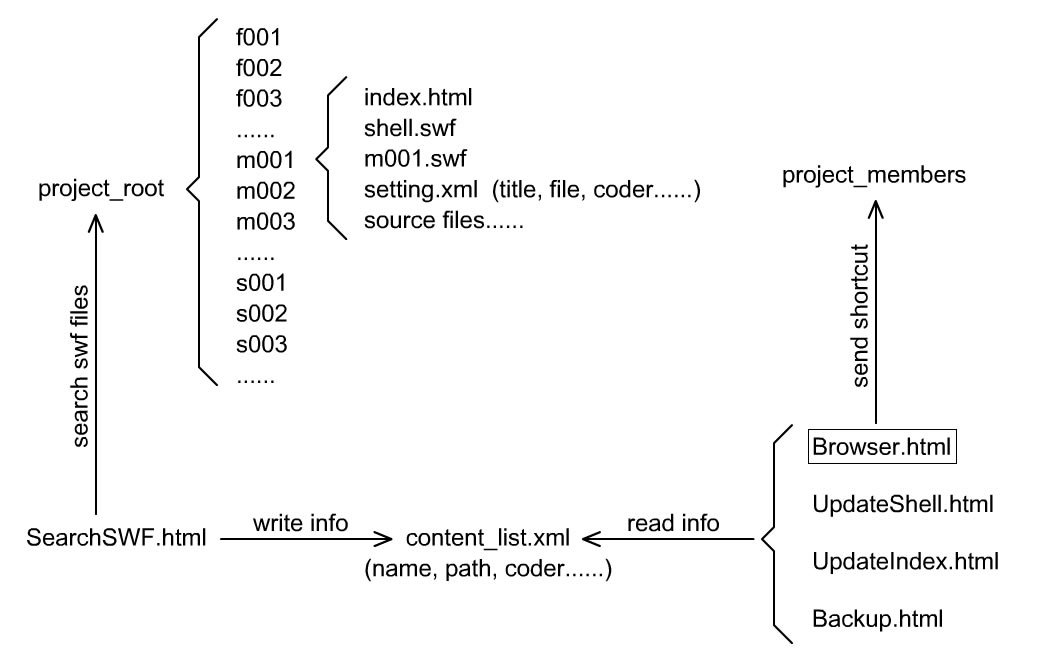
公司的一个项目,涉及N多课件(flash5~flash7版本),为统一界面和控制播放,用一个swf当做统一的shell去load这N多的课件,于是遇上了很多问题,记录一下:
1.很多课件中用到_root,有时这是无法避免的,所以加载後设置_lockroot=true;
2.有些课件中用到声音对象并链接库中的声音,这里如果用 new Sound() 建立声音对象(不指定目标),链接将会失败,可使用new Sound(this);
3.有的课件用到事件侦听,比如Key.addListener(obj),如果shell重复n次加载这个课件,侦听器也会累积到n个,这时按一下键盘就等于按了n下. 解决的办法就是在这个课件中加上代码:onUnload=function(){Key.removeListener(obj);}
4.有的课件用到 setIntervall ,如果shell重复多次加载这个课件就可能出现问题,办法和上面类似,在onUnload事件的回调函数中使用 clearInterval 清除;
5.有的课件用到 hitTest(x,y) 或是 hitTest(x,y,true) ,这时应该用 localToGlobal 事先将(x,y)转换为全局坐标,再使用hitTest,否则就会出问题
我要留言To Comment 阅读全文Read All | 回复Comments() 点击Count()
- 任意Object使用onEnterFrame
//一直不知道这个方法,所以写Class时里面一直没用过onEnterFrame
import mx.transitions.OnEnterFrameBeacon;
OnEnterFrameBeacon.init();
obj = {};
obj.onEnterFrame = function() {
trace("obj");
};
arr = [];
arr.onEnterFrame = function() {
trace("arr");
};
MovieClip.addListener(obj);
MovieClip.addListener(arr);
import mx.transitions.OnEnterFrameBeacon;
OnEnterFrameBeacon.init();
obj = {};
obj.onEnterFrame = function() {
trace("obj");
};
arr = [];
arr.onEnterFrame = function() {
trace("arr");
};
MovieClip.addListener(obj);
MovieClip.addListener(arr);