下面要制作的是guestbook的写数据库部分,这次flex需要传递数据给cf,调用as脚本来执行cf端定义的insertData
函数。下面是flex的全部代码:
<?xml version="1.0" encoding="utf-8"?>
<mx:Application xmlns:mx="http://www.macromedia.com/2003/mxml">
<mx:Script>
<![CDATA[
function insertdata(){
sendData.insertData(name.text,title.text,content.text);
}
]]>
</mx:Script>
<mx:WebService wsdl="http://localhost/cf/AddData.cfc?WSDL" id="sendData" showBusyCursor="true">
<mx:operation name="insertData"/>
</mx:WebService>
<mx:Binding source="sendData.insertData.result" destination="sta.text"/>
<mx:HBox width="372">
<mx:Label text="Name:" width="50"/>
<mx:TextInput text="" id="name"/>
</mx:HBox>
<mx:HBox width="372">
<mx:Label text="Title" width="50"/>
<mx:TextInput text="" width="301" id="title"/>
</mx:HBox>
<mx:HBox width="372">
<mx:Label text="Content:" width="50"/>
<mx:TextArea text="" width="300" height="79" id="content"/>
</mx:HBox>
<mx:HBox width="268">
<mx:Button label="Submit" click="insertdata()"></mx:Button>
<mx:Button label="Clear" click="insertdata() "></mx:Button>
<mx:Text text="null" id="sta"></mx:Text>
</mx:HBox>
</mx:Application>
截图:
图片如下:
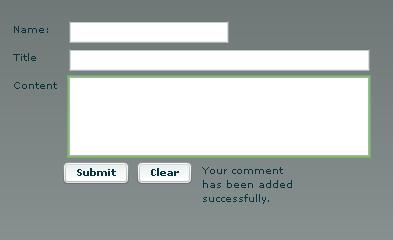
注意script标签部分的函数------
下面是cf端的函数代码:
<cfcomponent>
<cffunction name="insertData" access="remote" returntype="string">
<cfargument name="myName" type="string" required="yes">
<cfargument name="myTitle" type="string" required="yes">
<cfargument name="myContent" type="string" required="yes">
<cfset Date="#DateFormat(Now(), 'yyyy/mm/dd')#">
<cfquery datasource="mygb">
INSERT INTO mygb(name,title,content,mdate) valueS('#myName#','#myTitle#','#myContent#','#Date#')
</cfquery>
<cfset result="Your comment has been added successfully.">
<cfreturn result>
</cffunction>
</cfcomponent>
函数。下面是flex的全部代码:
<?xml version="1.0" encoding="utf-8"?>
<mx:Application xmlns:mx="http://www.macromedia.com/2003/mxml">
<mx:Script>
<![CDATA[
function insertdata(){
sendData.insertData(name.text,title.text,content.text);
}
]]>
</mx:Script>
<mx:WebService wsdl="http://localhost/cf/AddData.cfc?WSDL" id="sendData" showBusyCursor="true">
<mx:operation name="insertData"/>
</mx:WebService>
<mx:Binding source="sendData.insertData.result" destination="sta.text"/>
<mx:HBox width="372">
<mx:Label text="Name:" width="50"/>
<mx:TextInput text="" id="name"/>
</mx:HBox>
<mx:HBox width="372">
<mx:Label text="Title" width="50"/>
<mx:TextInput text="" width="301" id="title"/>
</mx:HBox>
<mx:HBox width="372">
<mx:Label text="Content:" width="50"/>
<mx:TextArea text="" width="300" height="79" id="content"/>
</mx:HBox>
<mx:HBox width="268">
<mx:Button label="Submit" click="insertdata()"></mx:Button>
<mx:Button label="Clear" click="insertdata() "></mx:Button>
<mx:Text text="null" id="sta"></mx:Text>
</mx:HBox>
</mx:Application>
截图:
图片如下:
注意script标签部分的函数------
下面是cf端的函数代码:
<cfcomponent>
<cffunction name="insertData" access="remote" returntype="string">
<cfargument name="myName" type="string" required="yes">
<cfargument name="myTitle" type="string" required="yes">
<cfargument name="myContent" type="string" required="yes">
<cfset Date="#DateFormat(Now(), 'yyyy/mm/dd')#">
<cfquery datasource="mygb">
INSERT INTO mygb(name,title,content,mdate) valueS('#myName#','#myTitle#','#myContent#','#Date#')
</cfquery>
<cfset result="Your comment has been added successfully.">
<cfreturn result>
</cffunction>
</cfcomponent>
回复Comments
作者:
{commentrecontent}