继续~
现在就是美化阶段~!
·在最开头添加CSS样式。
下面是我这里的设定,可以COPY回家参考~!^_^
<STYLE type=text/css>
<!--
/******* 全局样式定义 *******/
/*BACKGROUND-ATTACHMENT:fixed指背景固定,不随同滚动条一起移动~。如果不需要固定就不要写这一条。*/
/*BACKGROUND-POSITION:背景定位。横向位置有left、center、right三种,纵向有top、center、bottom三种,自由组合~*/
/*BACKGROUND-REPEAT:背景重复。no-repeat指背景不重复。另外,repeat-x指仅横向重复,repeat-y指仅纵向重复*/
/*MARGIN 是内容和页边的距离,我全部都设为零,就是所有的东西紧贴页边不留空 */
/*scrollbar是滚动条的设定 */
body{ BACKGROUND-COLOR: #ffffff;
BACKGROUND-IMAGE: url(http://waterynightfall.51.net/index.jpg);
BACKGROUND-ATTACHMENT: fixed;
BACKGROUND-POSITION:left bottom;
BACKGROUND-REPEAT: no-repeat;
MARGIN-TOP:0px; MARGIN-bottom:0px; MARGIN-right:0px; MARGIN-left:0px;
scrollbar-base-color: #ffffff;
scrollbar-face-color: #E4EFE4;
scrollbar-track-color: #ffffff;
scrollbar-arrow-color: #ffffff;
scrollbar-3dlight-color: #ffffff;
scrollbar-highlight-color: #ffffff;
scrollbar-shadow-color: #ffffff;
scrollbar-darkshadow-color: #ffffff;
}
/* “a” 这里是超链接的设定,a=超链接的一般状态active=按下动作时,visited=访问过的超链接,hover=鼠标悬停时 */
a {
COLOR: #63AB94; text-decoration: none
}
a:active {
COLOR: #a0a080; text-decoration: none
}
a:visited {
COLOR: #779191;text-decoration: none
}
a:hover {
COLOR: #AEB574; left:1px; top:1px;cursor:default; POSITION: relative; text-decoration: none; }
td,p,div,input,select,textarea{font-family: "Verdana"; font-size:9pt}
td.pantitle {font:bold 12px;letter-spacing:2px;color:white;background-color:#666666;line-height:normal;padding:4 2 2 2}
td.pancontent {border:1px solid #666666;}
td.pansplit {height:10px}
.digital {font-family: "Georgia";}
/******* 日历样式定义 *******/
.calendar {color:#333333;font-family:Georgia;text-align:center;cursor:default;border:0}
.calendar tr.weekname {background-color:#E4EFE4;color:#ffffff;font-weight:bold;}
.calendar td.havelog {background-color:#efefef;color:#63AB94;font-weight:bold;cursor:hand}
.calendar td.today {color:#779191;font-weight:bold }
.calendar td.selected {color:#AEB574;font-weight:bold }
/******* 日志样式定义 *******/
.lognav {} /*日志导航区域*/
.loglist {} /*日志列表区域*/
.loglist .title {} /*日志标题*/
.loglist .info {} /*日志其他信息*/
.loglist .separator {} /*日志分隔行*/
/******* 分类样式定义 *******/
.classes {}
/******* 友情链接样式定义 *******/
.links {line-height:15px;}
.links .textlinks {height:normal} /*仅用于文字链接*/
/******* 搜索表单样式定义 *******/
.search {}
.search select {width:100px;}
/******* 计数器样式定义 *******/
.counter {}
/******* RSS 样式定义 *******/
.rss {}
.stylebottom {color: #FFFFFF}
-->
</STYLE>
详细的~参照以下说明自己修改~
<STYLE type=text/css>
<!--
/******* 全局样式定义 *******/
body,td,p,div,input,select,textarea
{font-family: "Verdana","Arial"; font-size:12px}
BODY {MARGIN: 0px;BACKGROUND-COLOR: #336666}
a {color: #cccccc; text-decoration: none}
a:visited {color: #cccccc; text-decoration: none}
a:hover {color: #cc6600}
a:active {color: #cc6600; text-decoration: underline}
a.txtlink {color: #666666; text-decoration: none}
a.txtlink:visited {color: #666666; text-decoration: none}
a.txtlink:hover {color: #cccccc}
a.txtlink:active {color: #cccccc; text-decoration: underline}
table.pan {text-align:center}
/*******
td.pantitle {font:bold 12px;letter-spacing:2px;color:#cccccc;
background-color:#666666;line-height:normal;padding:4 2 2 2}
td.pancontent {border:1px solid #666666;background-color:#cccccc}
td.pansplit {height:10px}
.digital {font-family:Georgia}
*******/
/******* 日志样式定义 *******/
.lognav {font-size: 9pt;color: #cccccc} /*日志导航区域*/
.loglist {font-size: 9pt;color: #000000} /*日志列表区域*/
.loglistTitle {color: #333333;font-size: 10.5pt;font-weight: bold} /*日志标题*/
.loglistInfo {font-size: 9pt;color: #bbbbbb} /*日志其他信息*/
.loglist .separator {font-size: 9pt;color: #999999} /*日志分隔行*/
/******* 日志内容样式定义 *******/
.info {font-size: 9pt;color: #bbbbbb} /*日志文章信息区域*/
.infoTitle {font-size: 12pt;font-weight: bold;color: #cc6600} /*日志文章题目*/
.content {font-size: 10.5pt;line-height: 150%;color: #000000} /*日志文章内容*/
/******* 日历样式定义 *******/
.calendar table {border:0}
.calendar td {border:0}
.calendar tr {border:0}
.calendar {color:#669999;font-family:Verdana;text-align:center;cursor:default;
border:0}
.calendar tr.weekname {color:#669999;font-weight:bold}
.calendar td.navYear {color:#cccccc}
.calendar td.navToday {color:#cccccc}
.calendar td.navMonth {color:#cccccc}
.calendar td.havelog {background-color:#cccccc;color:#006666;font-weight:bold;
cursor:hand}
.calendar td.today {color:red}
/******* 分类样式定义 *******/
.classes {}
/******* 友情链接样式定义 *******/
.links {line-height:15px;text-align:center;color: #333333; text-decoration: none}
.links a {color: #333333; text-decoration: none}
.links a:visited {color: #333333; text-decoration: none}
.links a:hover {color: #cccccc}
.links a:active {color: #cc6600; text-decoration: underline}
.links .textlinks {height:normal} /*仅用于文字链接*/
/******* 最新评论样式定义 *******/
.newcomment {line-height:15px;color: #333333; text-decoration: none}
.newcomment a {color: #333333; text-decoration: none}
.newcomment a:visited {color: #333333; text-decoration: none}
.newcomment a:hover {color: #cccccc}
.newcomment a:active {color: #cc6600; text-decoration: underline}
/******* 搜索表单样式定义 *******/
.search {line-height:15px;text-align:center;color: #333333; text-decoration: none}
/******* 计数器样式定义 *******/
.counter {line-height:15px;text-align:center;color: #333333; text-decoration: none}
/******* RSS 样式定义 *******/
.rss {}
/******* 本模板样式自定义 *******/
.styleblogtitle {
font-size: 32px;
color: #ffffff;
}
.styleremark {
color: #666666;
font-size: 12px;
font-weight: bold;
}
.styleconlist {color: #666666}
-->
</STYLE>
·最后把全部的HTML源代码copy到这里的模板~
图片如下:
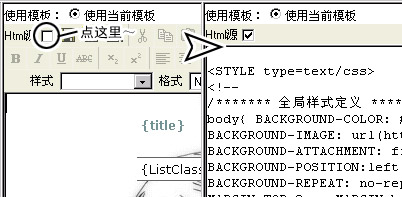
OK~!完成!
详细的也可以参考5DBlog高级模板设计三部曲~
有问题就留言吧~*^_^*
现在就是美化阶段~!
·在最开头添加CSS样式。
下面是我这里的设定,可以COPY回家参考~!^_^
<STYLE type=text/css>
<!--
/******* 全局样式定义 *******/
/*BACKGROUND-ATTACHMENT:fixed指背景固定,不随同滚动条一起移动~。如果不需要固定就不要写这一条。*/
/*BACKGROUND-POSITION:背景定位。横向位置有left、center、right三种,纵向有top、center、bottom三种,自由组合~*/
/*BACKGROUND-REPEAT:背景重复。no-repeat指背景不重复。另外,repeat-x指仅横向重复,repeat-y指仅纵向重复*/
/*MARGIN 是内容和页边的距离,我全部都设为零,就是所有的东西紧贴页边不留空 */
/*scrollbar是滚动条的设定 */
body{ BACKGROUND-COLOR: #ffffff;
BACKGROUND-IMAGE: url(http://waterynightfall.51.net/index.jpg);
BACKGROUND-ATTACHMENT: fixed;
BACKGROUND-POSITION:left bottom;
BACKGROUND-REPEAT: no-repeat;
MARGIN-TOP:0px; MARGIN-bottom:0px; MARGIN-right:0px; MARGIN-left:0px;
scrollbar-base-color: #ffffff;
scrollbar-face-color: #E4EFE4;
scrollbar-track-color: #ffffff;
scrollbar-arrow-color: #ffffff;
scrollbar-3dlight-color: #ffffff;
scrollbar-highlight-color: #ffffff;
scrollbar-shadow-color: #ffffff;
scrollbar-darkshadow-color: #ffffff;
}
/* “a” 这里是超链接的设定,a=超链接的一般状态active=按下动作时,visited=访问过的超链接,hover=鼠标悬停时 */
a {
COLOR: #63AB94; text-decoration: none
}
a:active {
COLOR: #a0a080; text-decoration: none
}
a:visited {
COLOR: #779191;text-decoration: none
}
a:hover {
COLOR: #AEB574; left:1px; top:1px;cursor:default; POSITION: relative; text-decoration: none; }
td,p,div,input,select,textarea{font-family: "Verdana"; font-size:9pt}
td.pantitle {font:bold 12px;letter-spacing:2px;color:white;background-color:#666666;line-height:normal;padding:4 2 2 2}
td.pancontent {border:1px solid #666666;}
td.pansplit {height:10px}
.digital {font-family: "Georgia";}
/******* 日历样式定义 *******/
.calendar {color:#333333;font-family:Georgia;text-align:center;cursor:default;border:0}
.calendar tr.weekname {background-color:#E4EFE4;color:#ffffff;font-weight:bold;}
.calendar td.havelog {background-color:#efefef;color:#63AB94;font-weight:bold;cursor:hand}
.calendar td.today {color:#779191;font-weight:bold }
.calendar td.selected {color:#AEB574;font-weight:bold }
/******* 日志样式定义 *******/
.lognav {} /*日志导航区域*/
.loglist {} /*日志列表区域*/
.loglist .title {} /*日志标题*/
.loglist .info {} /*日志其他信息*/
.loglist .separator {} /*日志分隔行*/
/******* 分类样式定义 *******/
.classes {}
/******* 友情链接样式定义 *******/
.links {line-height:15px;}
.links .textlinks {height:normal} /*仅用于文字链接*/
/******* 搜索表单样式定义 *******/
.search {}
.search select {width:100px;}
/******* 计数器样式定义 *******/
.counter {}
/******* RSS 样式定义 *******/
.rss {}
.stylebottom {color: #FFFFFF}
-->
</STYLE>
详细的~参照以下说明自己修改~
<STYLE type=text/css>
<!--
/******* 全局样式定义 *******/
body,td,p,div,input,select,textarea
{font-family: "Verdana","Arial"; font-size:12px}
BODY {MARGIN: 0px;BACKGROUND-COLOR: #336666}
a {color: #cccccc; text-decoration: none}
a:visited {color: #cccccc; text-decoration: none}
a:hover {color: #cc6600}
a:active {color: #cc6600; text-decoration: underline}
a.txtlink {color: #666666; text-decoration: none}
a.txtlink:visited {color: #666666; text-decoration: none}
a.txtlink:hover {color: #cccccc}
a.txtlink:active {color: #cccccc; text-decoration: underline}
table.pan {text-align:center}
/*******
td.pantitle {font:bold 12px;letter-spacing:2px;color:#cccccc;
background-color:#666666;line-height:normal;padding:4 2 2 2}
td.pancontent {border:1px solid #666666;background-color:#cccccc}
td.pansplit {height:10px}
.digital {font-family:Georgia}
*******/
/******* 日志样式定义 *******/
.lognav {font-size: 9pt;color: #cccccc} /*日志导航区域*/
.loglist {font-size: 9pt;color: #000000} /*日志列表区域*/
.loglistTitle {color: #333333;font-size: 10.5pt;font-weight: bold} /*日志标题*/
.loglistInfo {font-size: 9pt;color: #bbbbbb} /*日志其他信息*/
.loglist .separator {font-size: 9pt;color: #999999} /*日志分隔行*/
/******* 日志内容样式定义 *******/
.info {font-size: 9pt;color: #bbbbbb} /*日志文章信息区域*/
.infoTitle {font-size: 12pt;font-weight: bold;color: #cc6600} /*日志文章题目*/
.content {font-size: 10.5pt;line-height: 150%;color: #000000} /*日志文章内容*/
/******* 日历样式定义 *******/
.calendar table {border:0}
.calendar td {border:0}
.calendar tr {border:0}
.calendar {color:#669999;font-family:Verdana;text-align:center;cursor:default;
border:0}
.calendar tr.weekname {color:#669999;font-weight:bold}
.calendar td.navYear {color:#cccccc}
.calendar td.navToday {color:#cccccc}
.calendar td.navMonth {color:#cccccc}
.calendar td.havelog {background-color:#cccccc;color:#006666;font-weight:bold;
cursor:hand}
.calendar td.today {color:red}
/******* 分类样式定义 *******/
.classes {}
/******* 友情链接样式定义 *******/
.links {line-height:15px;text-align:center;color: #333333; text-decoration: none}
.links a {color: #333333; text-decoration: none}
.links a:visited {color: #333333; text-decoration: none}
.links a:hover {color: #cccccc}
.links a:active {color: #cc6600; text-decoration: underline}
.links .textlinks {height:normal} /*仅用于文字链接*/
/******* 最新评论样式定义 *******/
.newcomment {line-height:15px;color: #333333; text-decoration: none}
.newcomment a {color: #333333; text-decoration: none}
.newcomment a:visited {color: #333333; text-decoration: none}
.newcomment a:hover {color: #cccccc}
.newcomment a:active {color: #cc6600; text-decoration: underline}
/******* 搜索表单样式定义 *******/
.search {line-height:15px;text-align:center;color: #333333; text-decoration: none}
/******* 计数器样式定义 *******/
.counter {line-height:15px;text-align:center;color: #333333; text-decoration: none}
/******* RSS 样式定义 *******/
.rss {}
/******* 本模板样式自定义 *******/
.styleblogtitle {
font-size: 32px;
color: #ffffff;
}
.styleremark {
color: #666666;
font-size: 12px;
font-weight: bold;
}
.styleconlist {color: #666666}
-->
</STYLE>
·最后把全部的HTML源代码copy到这里的模板~
图片如下:
OK~!完成!
详细的也可以参考5DBlog高级模板设计三部曲~
有问题就留言吧~*^_^*
回复Comments
作者:
{commentrecontent}