要把BLOG修改成自己独有的样子啊!呵呵~
我也是新手的说~完全的初级~只能玩玩初级的花样……不过对我来说也已经足够了。希望对你也有些帮助哦~~*^_^*
那么,开始咯~!
·首先决定一下需要什么样式的版面。这个就看个人的兴趣了,可以广~泛~的参考别人的BLOG~!
·然后,开始制作版面~!
推荐使用Dreamweaver,因为我就用这个。(什么理由……)
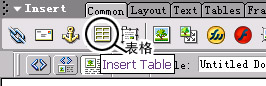
最常用的是“表格”↓要好好使用~!
图片如下:
关于属性:
图片如下:
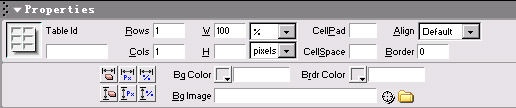
要制作没有间隙的表格就把cellpad和cellspace都设定为“0”(我用的是英文版的……汉化后不知道叫什么,不过应该比较好理解……=_=)
就和制作网页一样~~主要是在Dreamweaver里制作。
其他的……参照相关教材。(汗……)
也许以后会做教程……(远目……)
·可以随时查看html源代码~
图片如下:

比如我这个版面的源代码是这样的:
(可以copy到Dreamweaver的源代码里查看~)
<TABLE height="100%" cellSpacing=0 cellPadding=0 width=650 align=right border=0>
<TBODY>
<TR align=right>
<TD vAlign=top colSpan=2 height=94>
<TABLE cellSpacing=4 cellPadding=4 width="100%" border=0>
<TBODY>
<TR>
<TD><A href="./"><STRONG>{title}</STRONG></A></TD>
<TD vAlign=top align=middle width=185>
<P>{counter} </P>
<P>{Calendar}</P></TD></TR>
<TR>
<TD style="BORDER-TOP: #666666 1px solid; BORDER-BOTTOM: #666666 1px solid" bgColor=#ffffff colSpan=2 height=20>{ListClass Style=hor}</TD></TR></TBODY></TABLE></TD>
<TD width=58 background=http://www.5dblog.com/user7/nian/upload/2005-06/29_538.jpg rowSpan=4></TD></TR>
<TR align=right>
<TD vAlign=top align=left>
<TABLE cellSpacing=5 cellPadding=2 width="100%" border=0>
<TBODY>
<TR>
<TD style="LETTER-SPACING: 6px" bgColor=#e4efe4><STRONG>BLOG</STRONG></TD></TR>
<TR>
<TD style="FILTER: alpha(opacity=75)" bgColor=#ffffff rowSpan=3>{ListLog}</TD></TR>
<TR></TR>
<TR></TR></TBODY></TABLE></TD>
<TD vAlign=top width=220>
<TABLE cellSpacing=5 cellPadding=2 width="100%" border=0>
<TBODY>
<TR>
<TD style="LETTER-SPACING: 6px" bgColor=#e4efe4><STRONG>COMMENT</STRONG></TD>
</TR>
<TR>
<TD style="FILTER: alpha(opacity=75)" vAlign=top align=left>{NewComment
Length=10}</TD>
</TR>
<TR>
<TD style="LETTER-SPACING: 6px" align=left bgColor=#e4efe4><STRONG>LINK</STRONG></TD>
</TR>
<TR>
<TD style="FILTER: alpha(opacity=75)" vAlign=top align=left>{Link}</TD>
</TR>
<TR>
<TD style="LETTER-SPACING: 6px" bgColor=#e4efe4><STRONG>SEARCH</STRONG></TD>
</TR>
<TR>
<TD>{Search Detail=yes}</TD>
</TR>
</TBODY>
</TABLE>
<HR color=#666666 noShade SIZE=1>
{rss Detail=no}</TD></TR>
<TR align=right>
<TD vAlign=bottom colSpan=2 height=50>
<HR color=#666666 noShade SIZE=1>
<FONT color=#63ab94>Copyright(c)2005.nian. All rights reserved.</FONT>
<HR color=#666666 noShade SIZE=1>
</TD></TR></TBODY></TABLE>
·待续……
我也是新手的说~完全的初级~只能玩玩初级的花样……不过对我来说也已经足够了。希望对你也有些帮助哦~~*^_^*
那么,开始咯~!
·首先决定一下需要什么样式的版面。这个就看个人的兴趣了,可以广~泛~的参考别人的BLOG~!
·然后,开始制作版面~!
推荐使用Dreamweaver,因为我就用这个。(什么理由……)
最常用的是“表格”↓要好好使用~!
图片如下:
关于属性:
图片如下:
要制作没有间隙的表格就把cellpad和cellspace都设定为“0”(我用的是英文版的……汉化后不知道叫什么,不过应该比较好理解……=_=)
就和制作网页一样~~主要是在Dreamweaver里制作。
其他的……参照相关教材。(汗……)
也许以后会做教程……(远目……)
·可以随时查看html源代码~
图片如下:
比如我这个版面的源代码是这样的:
(可以copy到Dreamweaver的源代码里查看~)
<TABLE height="100%" cellSpacing=0 cellPadding=0 width=650 align=right border=0>
<TBODY>
<TR align=right>
<TD vAlign=top colSpan=2 height=94>
<TABLE cellSpacing=4 cellPadding=4 width="100%" border=0>
<TBODY>
<TR>
<TD><A href="./"><STRONG>{title}</STRONG></A></TD>
<TD vAlign=top align=middle width=185>
<P>{counter} </P>
<P>{Calendar}</P></TD></TR>
<TR>
<TD style="BORDER-TOP: #666666 1px solid; BORDER-BOTTOM: #666666 1px solid" bgColor=#ffffff colSpan=2 height=20>{ListClass Style=hor}</TD></TR></TBODY></TABLE></TD>
<TD width=58 background=http://www.5dblog.com/user7/nian/upload/2005-06/29_538.jpg rowSpan=4></TD></TR>
<TR align=right>
<TD vAlign=top align=left>
<TABLE cellSpacing=5 cellPadding=2 width="100%" border=0>
<TBODY>
<TR>
<TD style="LETTER-SPACING: 6px" bgColor=#e4efe4><STRONG>BLOG</STRONG></TD></TR>
<TR>
<TD style="FILTER: alpha(opacity=75)" bgColor=#ffffff rowSpan=3>{ListLog}</TD></TR>
<TR></TR>
<TR></TR></TBODY></TABLE></TD>
<TD vAlign=top width=220>
<TABLE cellSpacing=5 cellPadding=2 width="100%" border=0>
<TBODY>
<TR>
<TD style="LETTER-SPACING: 6px" bgColor=#e4efe4><STRONG>COMMENT</STRONG></TD>
</TR>
<TR>
<TD style="FILTER: alpha(opacity=75)" vAlign=top align=left>{NewComment
Length=10}</TD>
</TR>
<TR>
<TD style="LETTER-SPACING: 6px" align=left bgColor=#e4efe4><STRONG>LINK</STRONG></TD>
</TR>
<TR>
<TD style="FILTER: alpha(opacity=75)" vAlign=top align=left>{Link}</TD>
</TR>
<TR>
<TD style="LETTER-SPACING: 6px" bgColor=#e4efe4><STRONG>SEARCH</STRONG></TD>
</TR>
<TR>
<TD>{Search Detail=yes}</TD>
</TR>
</TBODY>
</TABLE>
<HR color=#666666 noShade SIZE=1>
{rss Detail=no}</TD></TR>
<TR align=right>
<TD vAlign=bottom colSpan=2 height=50>
<HR color=#666666 noShade SIZE=1>
<FONT color=#63ab94>Copyright(c)2005.nian. All rights reserved.</FONT>
<HR color=#666666 noShade SIZE=1>
</TD></TR></TBODY></TABLE>
·待续……
回复Comments
作者:
{commentrecontent}